


athenaPatient
4.84.64K Reviews
App Specs
- Version
- 1.25.2
- Updated On
- License
- Free
- Downloads
- 1,000,000+
- Developer
- athenahealth
- Categories
- Medical
- Platform
- Android, iOS
Screenshots
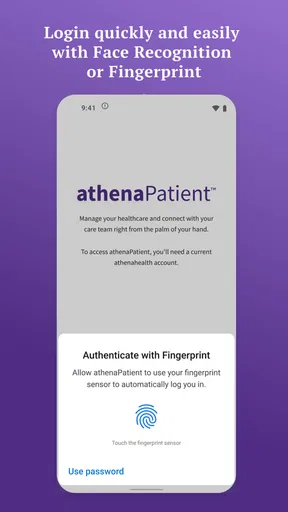
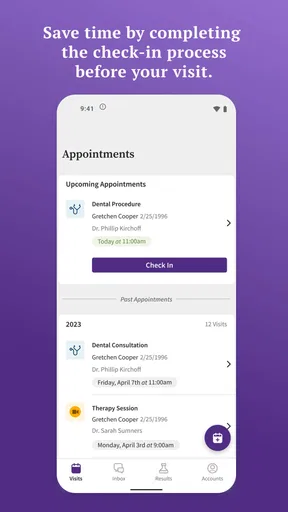
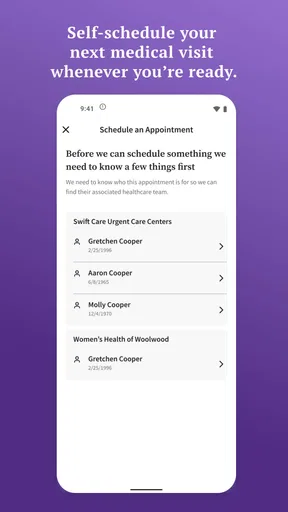
 Analysis by AppCompare
When I’m deciding whether a health app is worth keeping, I start with a practical question: will it make the care I already receive easier to manage, or will it become one more place to check? athenaPatient is most useful when your healthcare provider is connected to athenahealth and you want a phone-based way to handle routine contact and health information. It is not a replacement for a clinician, a general symptom checker, or a universal record that automatically brings every provider together.
That distinction matters before you install it. A patient portal is only as useful as the care relationship behind it, so I would first check whether your clinic uses the service and whether you can sign in to the right patient account. If your provider is not part of the system, the app may not help you with that practice, no matter how tidy its interface looks. If your care is already connected, having a familiar place to reach the team can be more convenient than searching through old emails or trying to remember which phone number to call.
Decide whether a provider-linked portal fits your routine
I see this as a companion to an existing care team rather than a standalone health organizer. The main decision is whether you want an app for communicating with your provider and reaching health information, or whether you need a broader tool that combines records from several unrelated clinics. Those are different jobs. A portal can make one healthcare relationship easier to follow, while a general health-record app or a paper folder may be better for keeping a complete picture across providers.
It is also worth thinking about who will use the account. If you manage your own appointments and messages, a personal login may be straightforward. If you help a parent, partner, or child, do not assume that installing the app automatically gives you permission to see another person’s information. Health accounts involve private records, and access arrangements are something to handle through the provider’s own process rather than by sharing passwords casually.
There is a useful everyday distinction here: an app can help with administrative communication, but it should not be treated as an emergency channel. If a concern is urgent, contact local emergency services or use the urgent-care route recommended by your clinician. For a routine question—such as clarifying what to bring to a scheduled visit—a patient portal is a more sensible place to start, provided your care team supports it.
Where athenaPatient can make care feel less scattered
athenaPatient is a medical app from athenahealth, and its purpose is tied to the patient-provider relationship. I would expect the greatest benefit when someone has recurring appointments or wants a convenient way to reach their care team between visits. Instead of treating every contact as a fresh phone call, a portal can give routine communication a place to live alongside health information. That can be especially helpful when you are coordinating a follow-up and do not want details buried in a text thread.
Consider a realistic morning: you realize you need to ask your clinic a non-urgent question before an upcoming appointment. Rather than wait until you have time to call, you can check whether the app gives you an appropriate way to contact the team. If the answer requires a call or a clinical visit, the app has still helped you identify the next step; it has not turned a message into medical advice on demand. I find that boundary reassuring. Digital convenience is valuable, but it should not create the impression that every message will be answered immediately.
Worth Reading Before You Choose

EA SPORTS FC Mobile 26 Is a Bigger Football Game, but It Takes Time

Flipboard Shows What News Apps Must Do Beyond the Feed

Switching to Android Auto Means Rethinking Your Driving Routine

Google Calendar Makes a Crowded Week Easier to Manage

Ludo King Makes the Most of the Minutes Between Plans

Baby Panda World Brings Quick Play to Modern Phones, but Its Game Library Feels Busy
A less obvious way to get more value from any portal is to use it as a preparation tool, not only as a place to look after a visit. Before an appointment, write down the questions you tend to forget and check the information available to you so you can spot what you still need to ask. Afterward, make a note of the instructions you want to clarify with the care team. This does not depend on a special feature: it is a simple workflow that helps keep the conversation focused while leaving clinical decisions with your provider.
The app is free, which makes trying it a low-cost decision, but “free” does not mean it will work for every clinic or every patient. It is rated for Everyone, and its average rating is 4.8 from around 54,000 ratings, with roughly 3,700 written reviews. More than a million installs show that it has reached a substantial audience, though popularity alone cannot tell you whether your own provider is connected or whether the particular tools you need are available in your account.
What to expect from setup and everyday use
Getting started depends on linking the app to the appropriate healthcare provider and patient account. I would do that when I have a little time rather than while standing at a reception desk or trying to handle a time-sensitive issue. Keep the information your practice uses to identify you close at hand, follow the prompts carefully, and check that the account points to the right provider before relying on it. If you run into a sign-in or account-matching problem, contacting the clinic is more useful than repeatedly creating new accounts.
That account check is a small step with a real payoff. People can have similar names, old contact details, or more than one relationship with a clinic, and health information is not something I would want to guess about. Once you are in, take a moment to understand where the app places messages and health information. A quick orientation helps later, when you need to find something without tapping through every screen in a hurry.
For a recurring care routine, I would use the app as one part of a simple system: keep the portal for provider-related information and communication, and keep a separate personal calendar for commitments that involve other clinics, work, or family. That avoids assuming a single portal covers every part of your life. If your practice supports appointment actions in the app, you can use those tools for that provider; for appointments elsewhere, your own calendar remains the dependable cross-provider overview.
One trade-off of a provider-linked portal is that it may feel less useful when you change clinics or see specialists who use different systems. The convenience is strongest within the connected relationship; it does not automatically eliminate the need to track care elsewhere. If you are managing several providers, I would keep a concise list of their names and contact routes, and bring relevant records or questions to appointments rather than assuming that one app displays every detail from every source.
Using the app in the context of other care tools
I use a provider-linked portal as one part of a broader care routine, not as a replacement for every tool I already rely on. In this section, I’m looking at how to decide what belongs in the app, what is better handled elsewhere, and how to keep information organized when care spans more than one clinic.
Features That Stand Out
So, what makes this app tick? Let’s dive into some of the features that caught my eye:
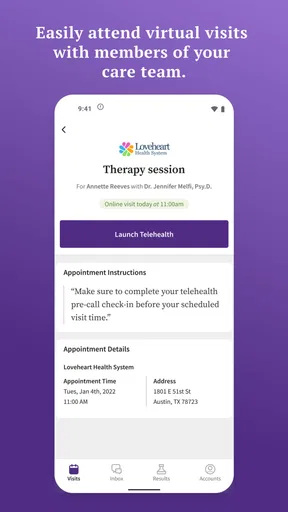
- Appointment Management: Say goodbye to those sticky notes with scribbled appointment times. The app lets you book, reschedule, and view upcoming appointments all in one place.
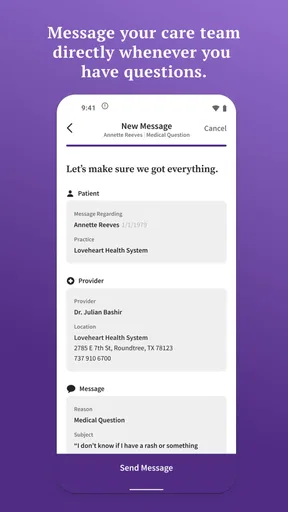
- Secure Messaging: Need to ask your doctor a quick question? The secure messaging feature is incredibly handy for non-urgent queries that don’t need a full phone call or visit.
- Medication Tracking: Keeping track of your meds can be a headache, but this app has you covered with reminders to ensure you never miss a dose.
For decisions about medication, I would still rely on the instructions from the prescriber or pharmacist rather than treating an app reminder as a source of medical guidance. A reminder can support a routine, but it does not decide whether a dose should change or whether a new symptom is related to a medicine. If something about your treatment is unclear, ask the care team or pharmacist directly.
It is also helpful to separate reminders from a complete medication-management plan. If you take medicines prescribed by multiple clinicians, keep an up-to-date list that you can share during care visits, and check whether the information in your patient account matches what you are actually taking. Medication lists can become outdated when treatment changes, so a quick review at an appointment is more reliable than assuming an old entry remains current.
User Experience
The user interface is clean and intuitive, making navigation a piece of cake. Even if you’re not particularly tech-savvy, you’ll find everything you need without much fuss. I really appreciated the color-coded calendar, which makes it easy to quickly visualize upcoming appointments and tasks.
The app’s performance is generally smooth, although I did notice a slight lag when loading some sections. Not a deal-breaker, but something to keep in mind if you’re in a hurry. On the plus side, the app’s design is easy on the eyes, with a soothing color palette that feels inviting rather than clinical.
That occasional wait is a good reason not to make the app your only way to retrieve information when time is tight. If you need an address, appointment time, or instructions immediately, take a screenshot or write down the essentials when you have them, while following your own privacy habits and keeping sensitive information protected. For an urgent medical concern, use a direct phone or emergency route instead of waiting for a screen to load or a message to be answered.
Availability is another practical question. The current version is 1.23.4, and it requires iOS 11 or later on Apple devices; check that your phone meets the requirement before troubleshooting a failed installation. The app is also available for Android. Since phones and operating systems differ, I would keep the app updated through the usual app store and make sure notifications are set in a way that suits you, especially if you want to notice replies without turning every routine alert into a distraction.
When another option may suit you better
If you want one place to organize information from several health systems, a general-purpose health-record tool may fit that goal better, depending on what your providers support. If you mainly need to track appointments across work, family, and multiple clinics, an ordinary calendar can be simpler and more flexible. And if your main concern is a complicated treatment schedule, a dedicated medication organizer may offer a workflow more focused on that task. These alternatives are not automatically better; they solve different problems.
Likewise, a phone call remains the better choice when you need a conversation, need to clarify something quickly, or have been told to contact the clinic directly. Messaging is most appropriate for non-urgent matters where a written exchange makes sense. I would not use a portal message to report a sudden serious symptom or to seek an immediate decision, and I would not assume that sending a message means someone has already read it.
The cost of switching is mostly about changing habits and keeping your information straight. If you move between providers, you may have to use more than one portal, and the app cannot make separate clinic systems behave like one shared account. Before abandoning a tool you already use, consider whether athenaPatient will actually connect you to a provider you see. If it will, try it alongside your existing calendar for a while; if it will not, there is little benefit in moving your routine just for the sake of having another app.
Privacy and access deserve the same deliberate approach as convenience. Use a secure device lock, avoid sharing your login, and sign out or protect your phone if other people can access it. If you are assisting someone else with care, ask the provider how authorized access is handled. These habits matter more for a medical portal than they do for a casual notes app because the information involved is personal.
Final Thoughts
In a world where managing healthcare can often feel overwhelming, athenaPatient steps in as a trusty sidekick. Its features are thoughtfully designed to offer convenience and peace of mind, making it a valuable tool for anyone looking to streamline their healthcare management.
So, if you’re tired of juggling your health-related tasks, give athenaPatient a try. It might just become your new favorite app!
My recommendation is strongest for people whose provider is connected to athenahealth and who want a more convenient route to routine health information and non-urgent communication. I would skip it as a primary solution if you need a universal record across unrelated clinics, rapid medical advice, or a tool that can replace conversations with your care team. For everyone else, the sensible test is simple: confirm your provider connection, set up the account carefully, and see whether it makes your next routine interaction easier. If it does, it earns a place on your phone; if it adds another disconnected inbox, your existing calendar and direct contact with the clinic may serve you better.
Pros
- User-friendly interface simplifies navigation.
- Comprehensive health tracking features.
- Secure data encryption ensures privacy.
- Integrates seamlessly with health devices.
- Customizable alerts for medication reminders.
Cons
- Limited compatibility with older devices.
- Some features require premium subscription.
- Occasional sync issues with external devices.
- Interface can be slow on low-end phones.
- Customer support response can be delayed.
FAQs for athenaPatient
What is athenaPatient and who is it for?
athenaPatient is a comprehensive healthcare management app designed for patients who want to easily manage their medical information and appointments. It provides features like appointment scheduling, prescription management, and communication with healthcare providers. Ideal for anyone looking to streamline their healthcare experience, it’s suitable for patients of all ages.
How does athenaPatient ensure the security of my medical data?
athenaPatient prioritizes the security of your medical data by implementing advanced encryption protocols and secure login processes. The app complies with HIPAA regulations to ensure that all user information is kept confidential and protected against unauthorized access, providing peace of mind for users concerned about data privacy.
Can I use athenaPatient to communicate with my healthcare providers?
Yes, athenaPatient offers a secure messaging feature that allows users to communicate directly with their healthcare providers. This feature can be used to ask questions, request prescription refills, or receive medical advice, making it easier to stay in touch with your healthcare team without the need for in-person visits.
What devices are compatible with the athenaPatient app?
athenaPatient is compatible with both Android and iOS devices, ensuring wide accessibility for users. Whether you are using a smartphone or tablet, the app is designed to provide a seamless experience across different devices, allowing you to manage your healthcare needs on the go.
Does athenaPatient offer reminders for medications and appointments?
Absolutely, athenaPatient comes with built-in reminders for both medications and upcoming appointments. Users can set personalized alerts to ensure they never miss a dose or forget an important medical appointment, enhancing adherence to treatment plans and improving overall health management.


